- Home/
- Financial Advisor/
- Best Money Management Apps for Kids in 2026: Complete Guide for Parents
Best Money Management Apps for Kids in 2026: Complete Guide for Parents
7 top-rated apps tested | Ages 3-18 covered
June 7, 2026
7 top-rated apps tested | Ages 3-18 covered
June 7, 2026
Greenlight, BusyKid, and FamZoo lead our 2026 rankings after hands-on evaluation across 7 top-rated kids' money apps.
Teaching children financial literacy through digital money management apps has become essential in 2026. These apps blend practical allowance management with structured savings goals, giving kids hands-on financial experience via FDIC-insured prepaid debit cards designed for ages 3–18.
With so many options on the market, picking the right app for your family can feel overwhelming. We've tested and compared 7 of the most popular money apps for kids, covering ages 3 through 18, to help you find the best fit. Whether you're looking for a free starter option or a full-featured family banking platform, this guide breaks down exactly what each app offers — and where it falls short. If you're exploring broader financial tools for your household, our Financial Advisor comparison page covers budgeting, saving, and investing resources for the whole family.
We evaluated each app across six criteria that matter most to parents: age appropriateness, security and regulatory compliance (FDIC insurance, COPPA), pricing transparency, educational value, parental controls, and real-world user ratings. Our goal was to identify which apps deliver genuine financial education — not just a branded debit card.
We prioritized apps that offer hands-on money experiences (earning, saving, spending, and giving) over passive tracking. We also weighted security heavily: every app on this list partners with FDIC-insured banks and follows privacy protections designed for minors. Pricing was assessed on a value basis — a $5/month app that replaces multiple financial conversations can be well worth it, while free apps that lack depth may not move the needle.

BusyKid connects chores to real earnings and introduces kids as young as 5 to stock investing. It's one of the few apps that lets children buy real shares without trading fees, under full parental oversight. A strong pick for families who want to go beyond basic allowance management.
Pros:
Cons:
Pricing:
| Feature | Detail |
|---|---|
| Best Age Range | 5–17 |
| Pricing | $4/month (billed annually after 30-day trial) |
| Prepaid Card | Visa card included |
| Investment Features | Fee-free real stock purchases |
| Chore Tracking | Yes — customizable lists with automatic transfers |
| Charitable Giving | Yes |
» We tried BusyKid. Now it’s your turn
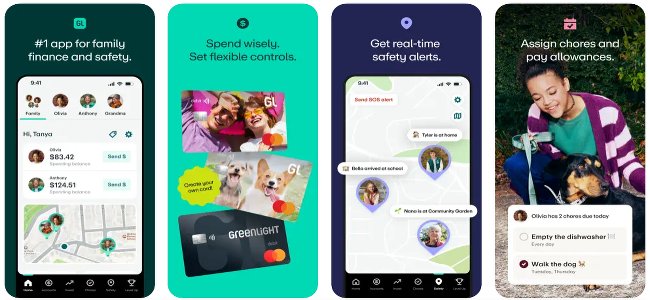
Greenlight offers extensive spending controls and investment tools in this category. Real-time transaction monitoring, category-based limits, and parent-approved investing support children of all ages. It's a platform that genuinely grows with your child — from elementary allowance through college budgeting.
Pros:
Cons:
Pricing:
| Feature | Detail |
|---|---|
| Best Age Range | All ages |
| Pricing | From $4.99/month; premium tiers up to $14.98/month |
| Prepaid Card | Yes — customizable debit card |
| Investment Features | Parent-approved stock investing |
| Chore Tracking | Yes — integrated with spending platform |
| Identity Protection | Yes (premium tier) |
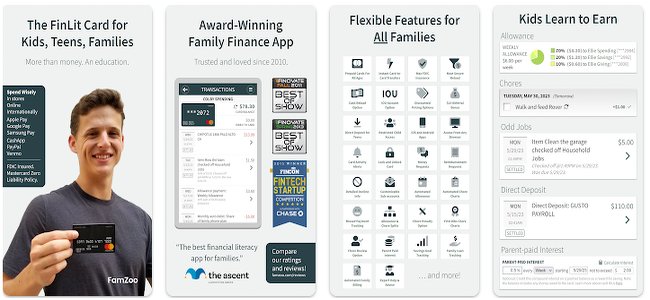
FamZoo has served families for over 15 years and creates a private family banking system. It covers earning, spending, saving, and educational borrowing from preschool through college. The standout feature: kids can "borrow" against future allowances to learn repayment discipline — without real credit risk.
Pros:
Cons:
Pricing:
| Feature | Detail |
|---|---|
| Best Age Range | 3–College |
| Pricing | $5.99/month (discounts for annual payment) |
| Prepaid Card | Yes |
| Investment Features | None |
| Chore Tracking | Yes — customizable with parent-paid interest |
| Family Loan System | Yes — educational borrowing feature |
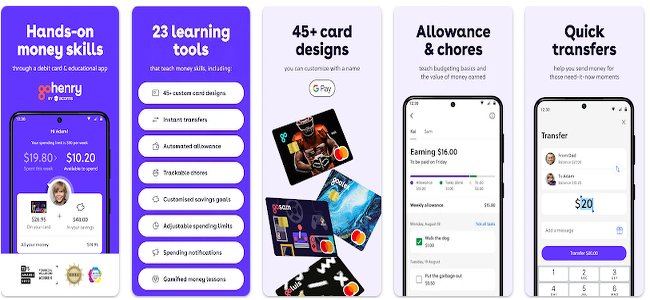
GoHenry, popular with UK and US families, uses progress tracking and milestone celebrations to keep kids engaged with their savings goals. Custom savings pots with names, images, and target dates give younger savers a tangible sense of accomplishment.
Pros:
Cons:
Pricing:
| Feature | Detail |
|---|---|
| Best Age Range | 6–18 |
| Pricing | $4.99/month per child; family plan $9.98/month (up to 4 kids) |
| Prepaid Card | Yes — customizable |
| Investment Features | None |
| Chore Tracking | Yes — with automatic allowance |
| Family Plan | $9.98/month for up to 4 children (~$2.50 per child) |

Rooster Money adapts to children's developmental stages — from star charts for preschoolers to a prepaid debit card for older kids. The three-pot system (Spend, Save, Give) introduces values-based financial education from an early age.
Pros:
Cons:
Pricing:
| Feature | Detail |
|---|---|
| Best Age Range | 3–18 (strongest for ages 3–10) |
| Pricing | Free tier; premium subscription adds features |
| Prepaid Card | Yes (premium tier) |
| Investment Features | None |
| Chore Tracking | Yes |
| Values Education | Built-in giving/charity component |

Step focuses on teen independence with safe credit building. The secured credit model lets teens build real credit history before college or careers — all without fees or overdraft risk.
Pros:
Cons:
Pricing:
| Feature | Detail |
|---|---|
| Best Age Range | 13–18 |
| Pricing | Free |
| Prepaid Card | Yes — Step Visa card |
| Investment Features | Credit building (not stock investing) |
| Chore Tracking | No |
| Direct Deposit | Yes — for teen jobs |
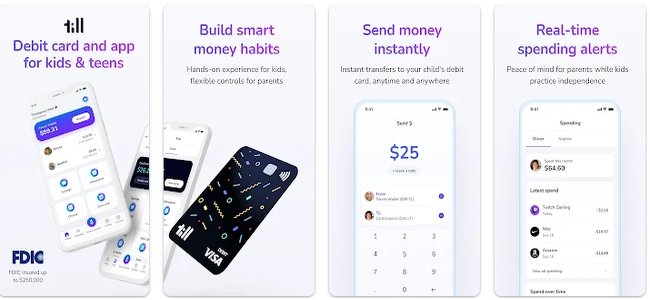
Till keeps allowance management simple — no subscription needed. It's the right choice for families who want basic coordination without the cost or complexity of full-featured suites.
Pros:
Cons:
Pricing:
| Feature | Detail |
|---|---|
| Best Age Range | 8–18 |
| Pricing | Free |
| Prepaid Card | Yes |
| Investment Features | None |
| Chore Tracking | No |
| Goal Setting | Yes — personalized savings goals |
The right app depends largely on your child's developmental stage. For ages 3–6, visual learning tools work best — Rooster Money's star charts and FamZoo's simple subaccounts introduce cause-and-effect without overwhelming young minds. Supplementing with financial literacy games can reinforce these early lessons through play.
Between ages 7 and 12, kids are ready for practical application: connecting chores to earnings, setting savings goals, and spending with a prepaid card. BusyKid and GoHenry are strong fits here. For teenagers (13–18), apps like Step and Greenlight introduce credit building, investing, and greater independence within guardrails. For a deeper look at teen-specific options, see our guide to the best budgeting apps for teens. As teens approach adulthood, they may also want to compare the best online banking accounts for a full-service partner.
Every app on this list partners with FDIC-insured banks, protecting deposited funds up to $250,000. That's the same coverage you'd get from a traditional savings account. Beyond deposit insurance, reputable apps follow COPPA regulations for children's data privacy, use bank-level encryption, and require parental verification during signup. Real-time transaction monitoring and spending limits actually offer greater security than traditional cash allowances, since parents can see every dollar in real time.
Greenlight goes a step further with identity theft protection on its premium tier — worth considering if your child will be making frequent online transactions.
Monthly costs range from free to $14.98, so there's an option for every budget:
For multi-child households, family plans make a significant difference. GoHenry's family plan covers up to 4 kids for $9.98/month — roughly $2.50 per child versus $4.99 each. BusyKid's single plan covers up to 5 kids. Start with a free option to see if your child engages, then upgrade when you're confident they'll use the features. For broader household budgeting tools that complement your child's app, check out our best family budgeting apps guide.
The spectrum of parental control varies significantly. Greenlight offers highly granular controls: category-based spending limits, merchant blocking, real-time alerts, and detailed analytics. FamZoo provides full banking oversight with subaccount management and transaction monitoring. GoHenry sits in the middle with dashboards, goal progress tracking, and customizable alerts. On the lighter end, Step gives teens more autonomy with less day-to-day parental oversight — by design, since it's built for older teens approaching independence.
Setting up your first kids' money app follows the same basic process regardless of which platform you choose:
Best practices for parents:
With seven solid options, the "best" app comes down to your family's priorities:
Children as young as 3 can benefit from visual money apps like Rooster Money. Comprehensive features become most valuable around ages 6–8 when children understand basic math concepts, cause-effect relationships, and can follow multi-step instructions for financial tasks.
Reputable kids money apps provide FDIC insurance protection up to $250,000, bank-level encryption, and specialized privacy protections under COPPA regulations. Real-time transaction monitoring and spending limits offer greater security than traditional cash allowances, with parents maintaining complete oversight through detailed transaction histories and instant alert systems.
By the Numbers: Structured money apps are having a measurable impact on long-term habits. According to Greenlight's 2025 Annual Family Trends Report, kids using comprehensive financial tools are adopting advanced habits earlier than ever, with two times as many kids auto-investing from their accounts compared to previous years, and the average age of a first-time investor dropping to just 12 years old.
Monthly costs range from free (Step, Till, Rooster Money basic) to $14.98 for premium Greenlight plans. Family plans like GoHenry's $9.98 for four children offer the best value for multi-child households, while single-child families often find mid-tier options ($4.99–$5.99) provide comprehensive features without premium costs.
Our editorial team evaluates financial products by testing them firsthand, comparing features against real family needs, and updating our rankings as apps evolve. We help consumers compare options with confidence — not hype. Every recommendation in this guide reflects current pricing, features, and user feedback verified against official sources and app store data for 2026.
These seven apps cover ages 3 through 18 with options for every budget — from fully free platforms like Step and Till to comprehensive family suites like Greenlight and FamZoo. The key is to start early, match app complexity to your child's developmental stage, and use the buyer's guide criteria above to find the right fit for your family's goals and finances.
This guide was last updated in June 2026. App features, pricing, and availability may change. Verify details with providers before making financial decisions for your children.
The BestMoney editorial team is composed of writers and experts covering a full range of financial services. Our mission is to simplify the process of selecting the right provider for every need, leveraging our extensive industry knowledge to deliver clear, reliable advice.
